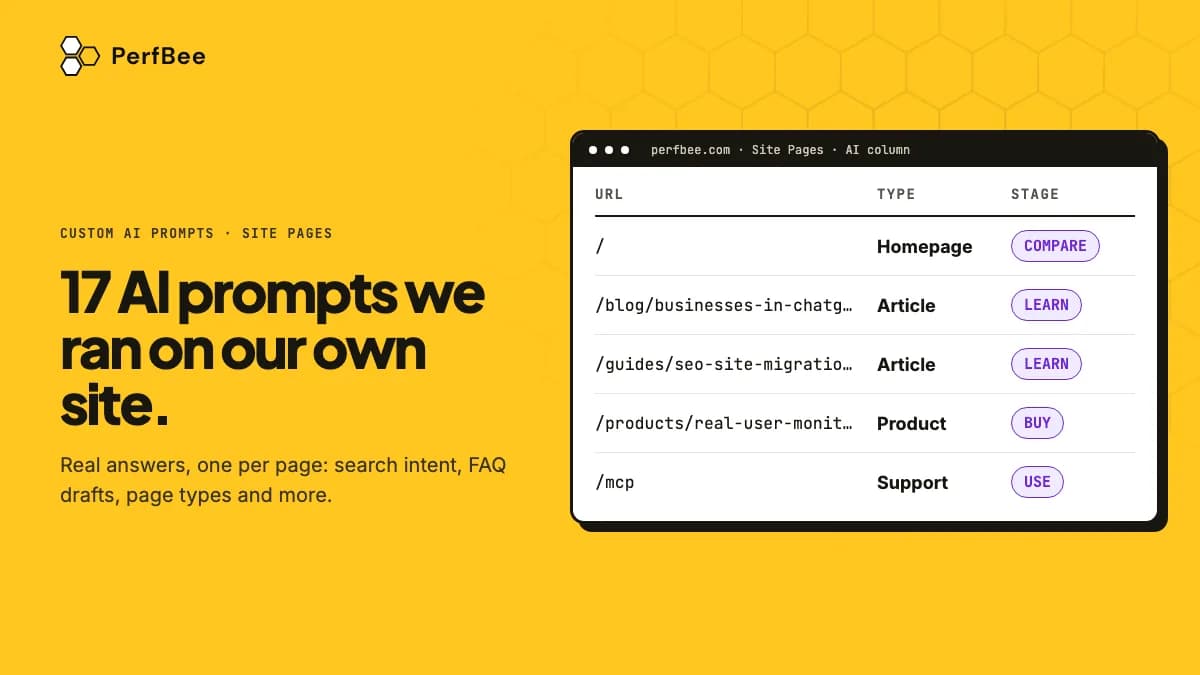
Short answer: PerfBee's custom AI prompts send each page's title, headings and main text to your own AI provider, and keep one answer per page in Site Pages. We ran 13 prompts on pages of perfbee.com and asked Ask AI 4 questions about single pages. Every answer below is copied from those runs. Where an answer is long we cut it and mark the cut; we never reworded one.
PerfBee is our product. The runs used the model claude-haiku-5-5 with our own Anthropic key, on 12 November 2026. The model comparison further down also used gpt-6.1-terra and gemini-3.8-flash, on the same day.
The 17 prompts at a glance
| # | Prompt | What you get | Runs on |
|---|---|---|---|
| 1 | Search intent and target query | The intent, the query the page should win, and how well the title and H1 fit it | Many pages |
| 2 | Title, H1 and description | Whether the three agree, and which one to change | Many pages |
| 3 | Meta descriptions | KEEP, or a new description written from the page | Many pages |
| 4 | Structured data fit | The schema type the page should carry, and what to add | Many pages |
| 5 | Answer up front | The question the page is for, and whether its opening answers it | Many pages |
| 6 | FAQ draft | Questions and answers taken only from the page | Many pages |
| 7 | Dates and years | Every date in the text, and what to check | Many pages |
| 8 | Brand voice | Which of your voice rules the page breaks, with a quote | Many pages |
| 9 | Leftover text | Placeholder text, test words and unfilled variables | Many pages |
| 10 | Page type and purpose | A type from a fixed list, and what a visitor comes to do | Many pages |
| 11 | Topic, funnel stage and reader | What the page is about, the reader's stage and who it is for | Many pages |
| 12 | One-line summary | One sentence per page, for a content inventory | Many pages |
| 13 | Facts for a comparison table | The facts a buyer compares, taken only from the page | Many pages |
| 14 | The quotable sentence | The one sentence an AI assistant would most likely quote | One page |
| 15 | JSON-LD | Structured data built only from facts on the page | One page |
| 16 | Social post | A short LinkedIn post that shares an article | One page |
| 17 | Live read | An answer from the page as it is now, not from the last crawl | One page |
Each section below shows the page a prompt ran on and the answer as it came back. Sections 1 to 8, 10 and 12 start from a ready template; open The full prompt to copy its text.
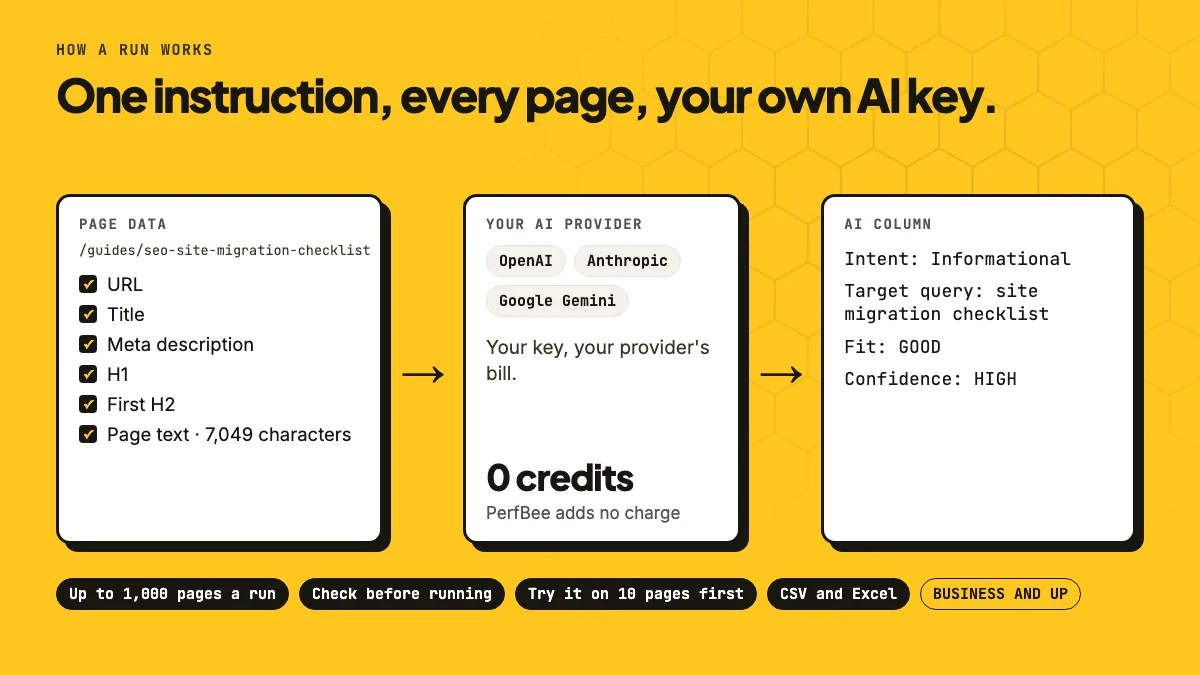
How a prompt runs on many pages
- Open Site Pages and tick the pages. Or filter the list and press Select all to take every page that matches, or pick a Segment.
- Press Run AI prompt. Pick one of the ready templates, or write your own instruction and tick the page fields it may read.
- Press Check before running. You see how many pages go out, to which provider and model, and about how many input tokens. Tick Try it on 10 of these pages first for a first look.
- Read the answers in the AI column, or download them with AI answers as CSV or Excel.
A run takes up to 1,000 pages. When you run the same prompt again after a new crawl, pages whose data did not change keep their answer and are not sent again. The page text comes from a Detailed crawl; a Fast crawl does not store it.
SEO checks for titles, descriptions and schema
1. Search intent and the query a page should win
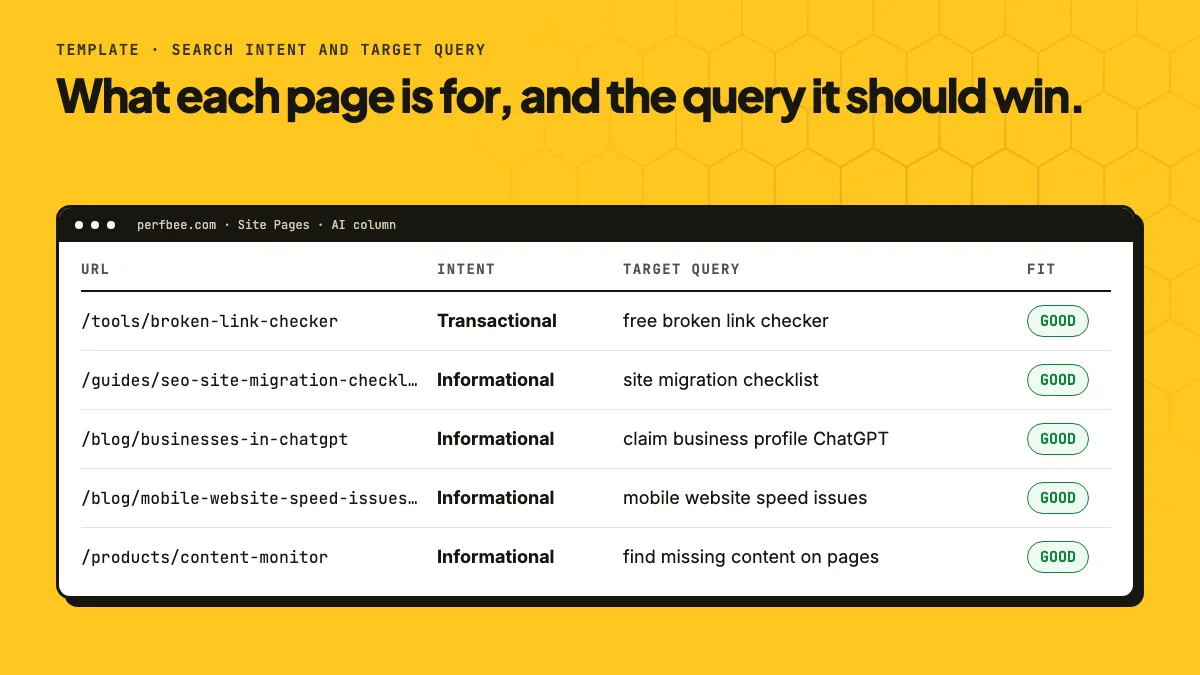
Template: Search intent and target query. The model names the intent from a fixed list, writes the 2 to 6 word query a real person would type, and says how well the title and H1 serve it.
The full prompt
Page fields to tick: URL, Title, Meta description, H1, First H2, Page text.
You are an SEO strategist. Decide what a searcher who lands on the page in the page data wants, and the search query the page should be built around.

Page text is the main text of the page, menu and footer left out. If the page data has no page text, decide from the address, title, description and headings, and answer LOW on the confidence line.

Intents: Informational (wants to learn), Comparison (weighs options before buying), Transactional (wants to buy, book or sign up now), Navigational (looks for this brand or one of its pages). Use one of these four, written exactly as here.

The query is what a real person would type: 2 to 6 words, using the page's own specific terms. Do not invent a product, place or brand the page data does not name.

Write the free text of your answer in the language the page is written in. Keep the labels and the words in capitals of the answer format in English, exactly as written.

Answer in exactly this format and nothing else:
Intent: <one intent from the list>
Target query: <the query>
Fit: GOOD, WEAK or POOR (how well the title and H1 serve that query)
Confidence: HIGH or LOW
Page: /tools/broken-link-checker
Intent: Transactional
Target query: free broken link checker
Fit: GOOD
Confidence: HIGH
2. Title, H1 and description that tell the same story
Template: Check title, H1, description. It reads the three together and says what differs and which one to change.
The full prompt
Page fields to tick: URL, Title, Meta description, H1.
You are an SEO auditor. Check whether the title, the H1 and the meta description of the page in the page data tell the same story, and whether each one is present and sensible.

Judge only what the page data shows. Flag: a missing or empty element, a title and H1 about different things, a description that repeats the title word for word, a mixed-language set, and an element that is clearly too long or too short.

Write the free text of your answer in the language the page is written in. Keep the labels and the words in capitals of the answer format in English, exactly as written.

Answer in exactly this format and nothing else:
Match: GOOD, MIXED or POOR
Problem: <the single biggest problem in one short sentence, or "none">
Fix: <the one change that would help most, in one short sentence>
Page: /products/content-monitor
Match: GOOD
Problem: none
Fix: Keep the title, H1 and description as they are, since all three describe Content Monitor finding missing content and none repeats another word for word.
3. Meta descriptions written from the page
Template: Write meta descriptions. It answers KEEP or REWRITE with a description, so you can filter the column for REWRITE and work through only those pages.
The full prompt
Page fields to tick: URL, Title, Meta description, H1.
You are a senior SEO copywriter. Write a meta description for the page in the page data.

Rules:
- 120 to 155 characters.
- Say what the visitor gets on this page, in plain words, using facts from the title, H1, URL or the current description. Do not invent features, prices, numbers or claims that are not in the page data.
- Start with what the page offers, not with the brand. End with a short, natural nudge only if it fits. No emoji, no quotation marks, no all caps.
- If the current description is already between 120 and 155 characters, specific and accurate, keep it exactly.

Write the free text of your answer in the language the page is written in. Keep the labels and the words in capitals of the answer format in English, exactly as written.

Answer in exactly this format and nothing else:
Verdict: KEEP or REWRITE
Description: <the description to use, the current one if KEEP>
Length: <number of characters>
Page: /mcp
Verdict: KEEP
Description: Connect Claude, ChatGPT, Claude Code or Cursor to PerfBee. Crawl your sites. Read broken links, SEO and AI readiness issues with their HTML element.
Length: 148
Models count characters loosely. Check the length of a new description yourself before you use it.
4. Structured data that fits the page
Template: Structured data fit. It compares the schema types on the page with what the text is, and names what to add. It also reads dates in the text.
The full prompt
Page fields to tick: URL, Title, H1, Structured data, Page text.
You are a structured data specialist. Decide which schema.org type fits the page in the page data best, and whether the structured data the page already carries matches it.

Page text is the main text of the page, menu and footer left out. The "Structured data" line lists the formats and types the page carries and the problems found in them; when the page data has no such line, the page was not checked. If the page data has no page text, decide from the address, title and H1.

Rules:
- Name types and properties in plain words, for example "Product with name, offers and brand". Never write JSON-LD, markup or code.
- Suggest only what the page supports: no Review or rating without reviews in the text, no FAQPage without questions and answers, no Product on a page that lists many products.

Write the free text of your answer in the language the page is written in. Keep the labels and the words in capitals of the answer format in English, exactly as written.

Answer in exactly this format and nothing else:
Best type: <one schema.org type>
Has it: YES, PARTLY, NO or NOT CHECKED
Add or fix: <the properties to add or the problem to fix, one short sentence, or "none">
Page: /blog/mobile-website-speed-issues-causes-and-fixes
Best type: BlogPosting with headline, author, publisher, datePublished, dateModified and image
Has it: YES
Add or fix: Confirm that the BlogPosting names the PerfBee team as author and that its datePublished and dateModified match the visible dates, May 21, 2026 and Sep 7, 2026, since the check does not list which properties are present.
Content checks that read the whole page text
5. Does the page answer its question in the first lines
Template: Does the page answer a question. AI assistants quote pages that answer up front. This template names the question the page is for and says whether the opening answers it.
The full prompt
Page fields to tick: URL, Title, H1, Page text.
An answer engine or a visitor reads the start of this page and wants a direct answer. From the title, H1 and page text in the page data, decide which question this page answers and whether the start of the text answers it in plain words.

Page text is the main text of the page, menu and footer left out. An opening that answers only part of the question is PARTLY. If the page data has no page text, or the text is only a cookie or error message, name the question from the title and H1 and write CANNOT JUDGE on the "Answered up front" line.

Write the free text of your answer in the language the page is written in. Keep the labels and the words in capitals of the answer format in English, exactly as written.

Answer in exactly this format and nothing else:
Question: <the question the page answers, one short sentence>
Answered up front: YES, PARTLY, NO or CANNOT JUDGE
Fix: <one short sentence on what to put in the first lines, or "none">
Page: /products/real-user-monitoring
Question: How can I measure how fast my site is for real visitors, and which pages are slow for them?
Answered up front: PARTLY
Fix: Open with a sentence that defines Real User Monitoring and names the Core Web Vitals it collects (LCP, INP, CLS), so the first lines answer what it measures, not only how it is installed.
6. An FAQ drafted from the page
Template: FAQ draft from the page. It writes questions a reader would ask and answers them only from the page. The last line names a question the page leaves open.
The full prompt
Page fields to tick: URL, Title, H1, Page text.
You write help content. Draft the questions a visitor of the page in the page data is likely to ask, answered only from what the page text says.

Page text is the main text of the page, menu and footer left out. If the page data has no page text, or the text is only a cookie or error message, write CANNOT JUDGE on the first line and nothing else.

Rules:
- 3 to 5 questions a real visitor would ask about the page's subject, one line each.
- Each answer is 1 or 2 short sentences and uses only facts the page text states. A question that matters but that the text does not answer goes on the "Missing" line, unanswered.
- No marketing tone, no invented prices, dates, numbers or promises.

Write the free text of your answer in the language the page is written in. Keep the labels and the words in capitals of the answer format in English, exactly as written.

Answer in exactly this format and nothing else:
FAQ: READY or CANNOT JUDGE
Q1: <question>
A1: <answer>
(Q2 and A2 up to Q5 and A5, as many as the text supports)
Missing: <one question the page should answer but does not, or "none">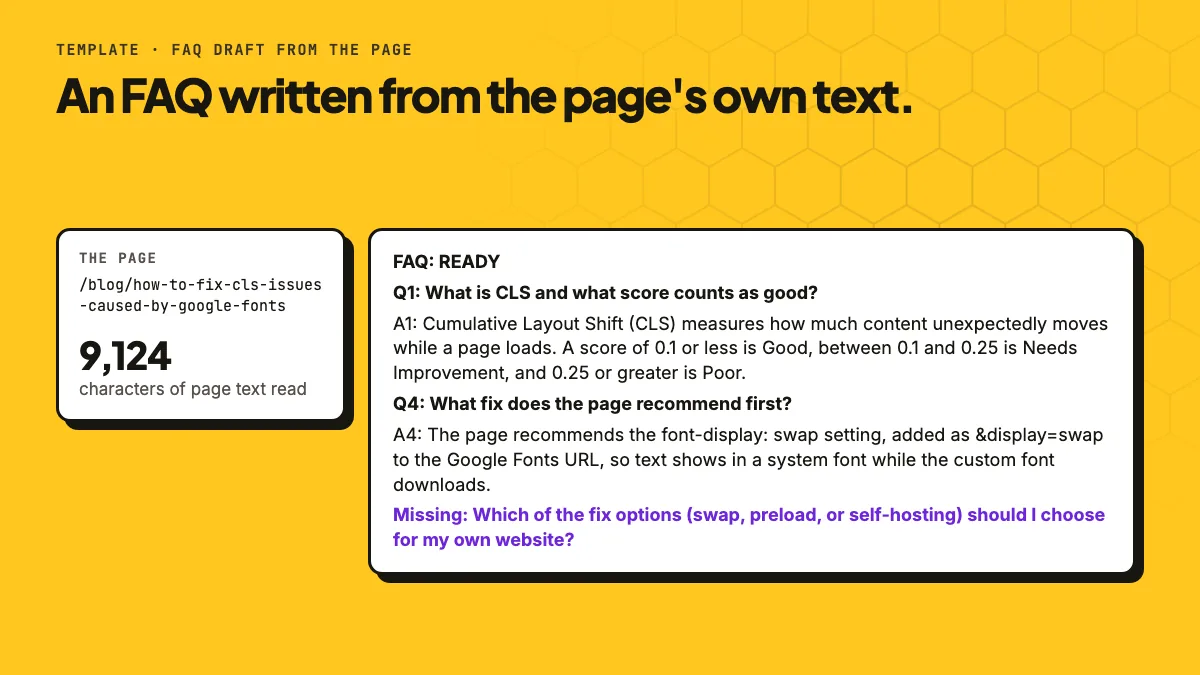
Page: /blog/how-to-fix-cls-issues-caused-by-google-fonts
FAQ: READY
Q1: What is CLS and what score counts as good?
A1: Cumulative Layout Shift (CLS) measures how much content unexpectedly moves while a page loads. A score of 0.1 or less is Good, between 0.1 and 0.25 is Needs Improvement, and 0.25 or greater is Poor.
Q2: How can Google Fonts cause layout shifts?
A2: The browser does not know a font's dimensions until the font is downloaded and applied, and the text may then change size and move content. The page says this is especially common with headings and other large text.
[Q3 cut]
Q4: What fix does the page recommend first?
A4: The page recommends the font-display: swap setting, added as &display=swap to the Google Fonts URL, so text shows in a system font while the custom font downloads. It also describes preloading fonts and self-hosting them as other options.
Q5: How do I check that the fix worked?
A5: Run a new Lighthouse audit and check the CLS score. The page also suggests monitoring real users with Real User Monitoring (RUM) tools.
Missing: Which of the fix options (swap, preload, or self-hosting) should I choose for my own website?
7. Dates and years that may be out of date
Template: Dates and years in the text. It lists every date and year it finds and says what to check. Run it on a whole blog and filter for the pages that need a look.
The full prompt
Page fields to tick: URL, Title, H1, Page text.
Find dates and years that the page text in the page data states, so a person can check whether the page is out of date: a campaign, offer or event with an end date, a year used as "this year" or "new", a product described as upcoming, wording like "until" or "ends on". You do not know today's date: never say a date has passed. Only quote what the text states.

Page text is the main text of the page, menu and footer left out. Judge only that text: answer NO when it states no date or year. If the page data has no page text, or the text is only a cookie or error message, answer CANNOT JUDGE.

Write the free text of your answer in the language the page is written in. Keep the labels and the words in capitals of the answer format in English, exactly as written.

Answer in exactly this format and nothing else:
Dates found: YES, NO or CANNOT JUDGE
What: <the date or year with the phrase around it, at most 15 words, or "none">
Check: <what a person should verify, one short sentence, or "none">
Page: /mcp
Dates found: YES
What: "Last updated: November 8, 2026"
Check: Confirm that this last-updated date is current and that the described Claude, ChatGPT and Cursor connection steps still match each app's current interface.
8. Your brand voice, rule by rule
Template: Brand voice check. It starts with four rules: speak to the reader as "you", short sentences, no hype words, and a number or a reason next to every claim. Edit them to fit your brand.
The full prompt
Page fields to tick: URL, Title, Meta description, H1, Page text.
Check whether the page in the page data follows these brand voice rules (the account owner edits them to fit the brand):
1. Speak to the reader as "you".
2. Short sentences and plain words.
3. No exclamation marks, no all caps, no hype words such as "amazing", "revolutionary" or "best ever".
4. Facts over claims: a claim needs a number or a reason next to it.

Page text is the main text of the page, menu and footer left out. Judge the title, description, H1 and page text against the rules. If the page data has no page text, judge the title, description and H1 only, and say so on the "Breaks" line.

Write the free text of your answer in the language the page is written in. Keep the labels and the words in capitals of the answer format in English, exactly as written.

Answer in exactly this format and nothing else:
Voice: FITS, MOSTLY or BREAKS
Breaks: <the rule broken most, with a short quote of at most 12 words, or "none">
Rewrite: <the quoted words rewritten to follow the rules, or "none">
Page: /products/content-monitor
Voice: MOSTLY
Breaks: Rule 4 (facts over claims), quote: "Set it up once."
Rewrite: "Set it up once. Checks then run inside each scheduled crawl, with no extra page loads."
9. Leftover text before a visitor sees it
This one is our own prompt. Copy it into Run AI prompt and tick URL, Title, H1 and Page text.
Page text is the main text of the page, menu and footer left out.

Look for text that should not be on a live page: placeholder text (lorem ipsum, TODO, TBD, XXX, "insert here"), test words, a template variable left unfilled such as {{name}} or %s, the personal email address or phone number of a person (a general support or sales address is fine), or a sentence cut off in the middle.

Write the free text of your answer in the language the page is written in. Keep the labels and the words in capitals of the answer format in English, exactly as written.

Answer in exactly this format and nothing else:
Found: YES or NO
What: <the kind of problem, or "none">
Quote: <the words as they appear on the page, at most 12, or "none">
Page: /guides/seo-site-migration-checklist
Found: NO
What: none
Quote: none
On a site with a few thousand pages, sort the column so the YES answers come first, and read each quote on the live page before you change anything.
Sorting pages and pulling facts out of them
10. Page type and purpose
Template: Page type and purpose. It picks a type from a closed list and says what a visitor comes to do.
The full prompt
Page fields to tick: URL, Title, H1, Page text.
Decide what kind of page this is and what a visitor comes to do. Use the address, title, H1 and page text in the page data.

Page text is the main text of the page, menu and footer left out. If the page data has no page text, decide from the address, title and H1.

Types: Homepage, Product, Category, Article, Support, Campaign, Store or service point, Account, Legal, Other. Use one of these ten, written exactly as here. A page that fits none of them (a tool, a company page, a search page) is Other. Choose Other with LOW confidence when the data does not decide it.

Write the free text of your answer in the language the page is written in. Keep the labels and the words in capitals of the answer format in English, exactly as written.

Answer in exactly this format and nothing else:
Type: <one type from the list>
Purpose: <what the visitor does here, one short sentence>
Confidence: HIGH or LOW
Page: /docs/fast-scan-vs-detailed-scan-vs-js-rendering
Type: Support
Purpose: The visitor compares the Site Crawler scan modes (Fast, Detailed, JS Rendering) and their credit costs to pick and configure the right scan.
Confidence: HIGH
11. Topic, funnel stage and reader
Our own prompt again. Tick URL, Title, H1 and Page text.
Page text is the main text of the page, menu and footer left out.

Say what the page in the page data is about and who it is written for. Stage is what the reader is doing: LEARN (finding out how something works), COMPARE (weighing tools or options), BUY (deciding on a product or a plan), USE (already a customer, doing a task).

Write the free text of your answer in the language the page is written in. Keep the labels and the words in capitals of the answer format in English, exactly as written.

Answer in exactly this format and nothing else:
Topic: <2 to 4 words>
Stage: LEARN, COMPARE, BUY or USE
Reader: <who the page is written for, at most 8 words>
Page: /guides/seo-site-migration-checklist
Topic: SEO site migration checklist
Stage: LEARN
Reader: SEO staff and site owners planning a migration
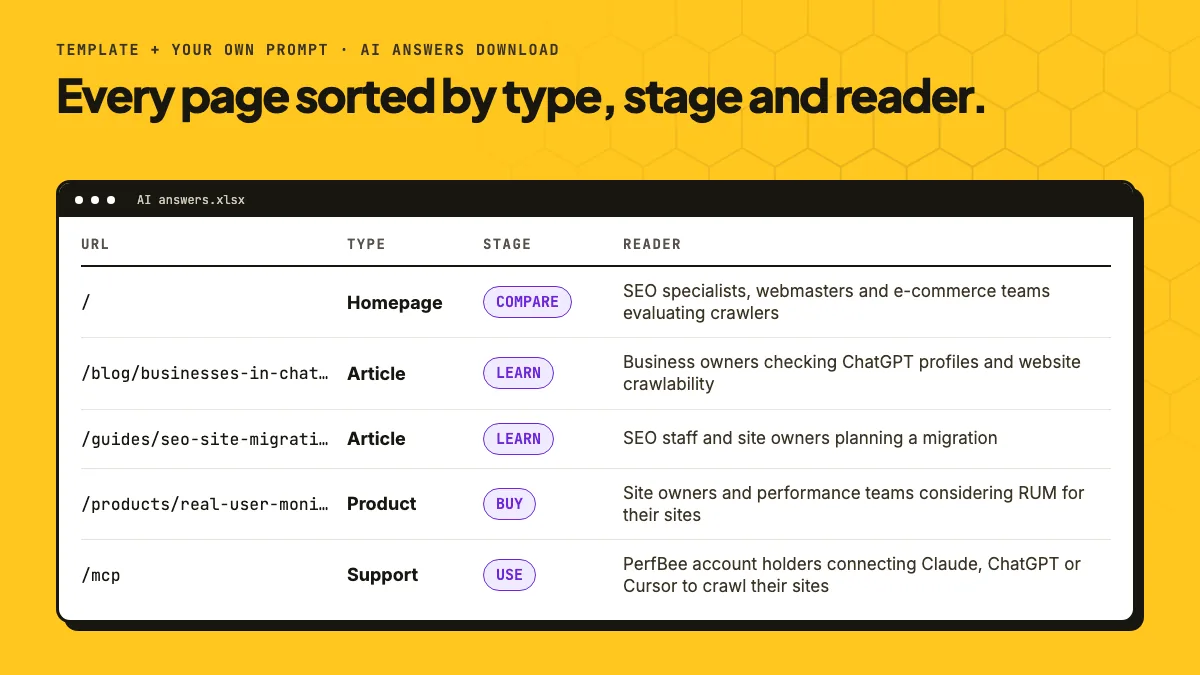
With every page labelled, a pivot table shows which stages have few pages, and which pages should link to each other.
12. A one-line summary of every page
Template: One-line summary. One sentence per page: what it is, what it covers, who it is for. It makes a content inventory you can read in minutes.
The full prompt
Page fields to tick: URL, Title, Meta description, H1, Page text.
Write one sentence that says what the page in the page data is and who it is for, for an llms.txt file or a site index.

Page text is the main text of the page, menu and footer left out. If the page data has no page text, write the sentence from the address, title, description and H1, and answer LOW on the confidence line.

Rules:
- One sentence of 15 to 30 words, plain and factual: what the page offers and for whom.
- No marketing words, no slogan, no claim the page data does not make. Start with the subject, not with "This page".

Write the free text of your answer in the language the page is written in. Keep the labels and the words in capitals of the answer format in English, exactly as written.

Answer in exactly this format and nothing else:
Summary: <the sentence>
Confidence: HIGH or LOW
Page: /tools/broken-link-checker
Summary: Free online tool that checks the first 100 links on one public web page for broken, redirected or slow responses, for site owners and SEO users who need a quick link check without creating an account.
Confidence: HIGH
13. Facts for a comparison table
Our own prompt. It turns product pages into rows of a table. The last sentence of the instruction matters most.
Page text is the main text of the page, menu and footer left out.

List the facts a buyer would put in a comparison table, taken only from the page text of the page data: what the product does, its main features, the plans it is included in, and any limit the page states with a number. Never add a fact the page does not state.

Write the free text of your answer in the language the page is written in. Keep the labels and the words in capitals of the answer format in English, exactly as written.

Answer in exactly this format and nothing else:
Product: <name>
Does: <one sentence>
Features: <up to 6, separated by semicolons>
Plans: <the plan names the page states, or "not stated">
Limits: <limits with their numbers, or "not stated">
Page: /products/real-user-monitoring
Product: Real User Monitoring (RUM)
Does: Measures page views in visitors' own browsers and shows which pages and page elements are slow for them, with email alerts when it gets worse.
Features: Measures LCP, CLS, INP, FCP and TTFB from real page views; dashboard splits results by mobile and desktop; lists busiest page groups with an impact score and the slow LCP element; breaks down data by browser, connection type and country; reports failed resources and JavaScript errors per page view; emails alerts comparing the last 24 hours with the previous 6 days
Plans: Business, Business+, Enterprise
Limits: Data kept 30 days on Business, 45 days on Business+, 60 days on Enterprise; [cut] alerts need at least 5 page views in the last 24 hours; alerts checked every 15 minutes; [cut] script size 1.9 KB (under 1 KB gzipped)
We checked the numbers against the page. Every one of them is there.
Ask AI: one question about one page
Page Detail has an Ask AI tab. You type any question about that page and pick a provider. The model reads the page's stored fields and main text. Tick Read the live page and PerfBee reads the page as it is now. Our four questions came back in 6 to 9 seconds.
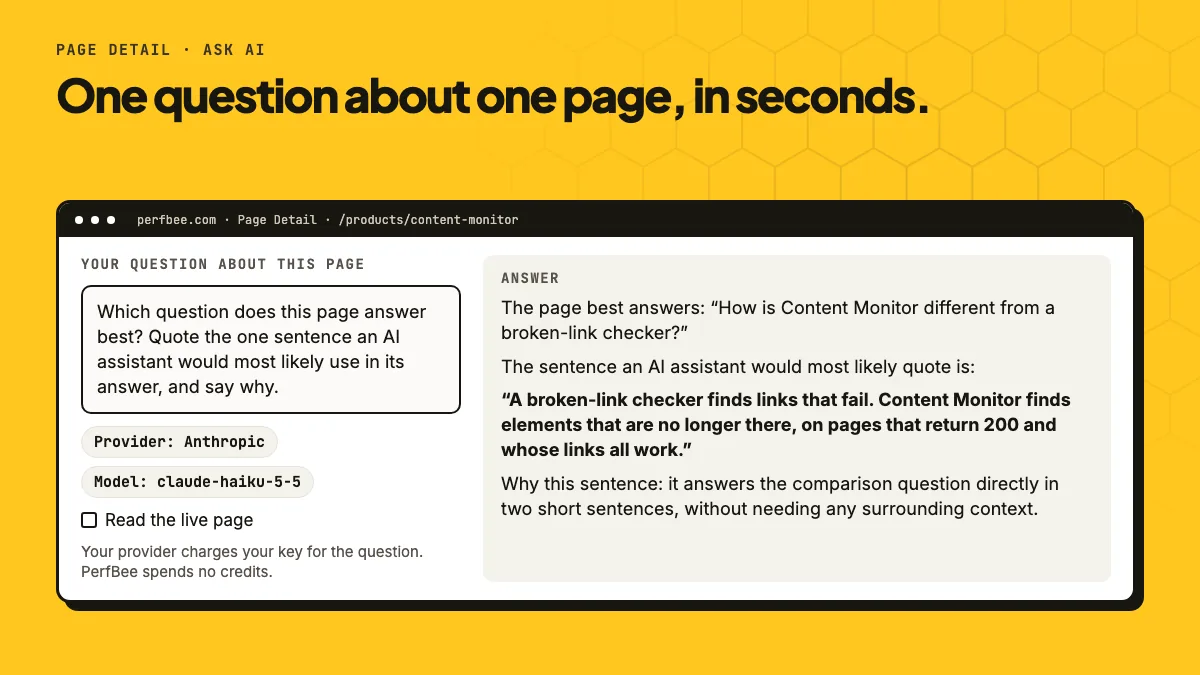
14. The sentence an AI assistant would quote
Page: /products/content-monitor
Question: Which question does this page answer best? Quote the one sentence an AI assistant would most likely use in its answer, and say why.
The page best answers: "How is Content Monitor different from a broken-link checker?"
The sentence an AI assistant would most likely quote is: "A broken-link checker finds links that fail. Content Monitor finds elements that are no longer there, on pages that return 200 and whose links all work."
Why this sentence: it answers the comparison question directly in two short sentences, without needing any surrounding context. It names both tools, contrasts what each one detects, and states the key difference (missing elements on pages that otherwise look healthy). The page's H1 makes the same point, but as a slogan, so the FAQ wording is the more precise and quotable answer.
This is the model's judgment of the page, not a record of what ChatGPT or other assistants actually quote. Use it to find the clearest answer on a page, and to rewrite the page when no sentence stands out.
15. JSON-LD you can paste
Ask for code and the model writes it after its answer. PerfBee checks the code before it shows it: it keeps HTML and JSON-LD built from safe parts, with links only to your own site. The code gets its own box with a Copy code button.
Page: /guides/seo-site-migration-checklist
Question: Write JSON-LD structured data for this page. Use only facts the page states, and say which schema type you chose and why.
Schema type chosen: Article. The page is a long-form guide (the page labels itself "Guide", with an H1, sections and a dated update), so Article describes it best. I did not choose HowTo, even though the content is a checklist, because the steps are mostly prose with sub-tasks and the page does not give a clean step list with names for each step. I did not add FAQPage, because the page already carries FAQPage JSON-LD and a second copy could conflict with it.
Only facts stated on the page are used: the H1 as headline, the meta description as description, the canonical URL, the "Updated November 8, 2026" date as dateModified, the declared language (en), and PerfBee as publisher with its domain. No datePublished or author is included, because the page does not state them.
<script type="application/ld+json">
{
  "@context": "https://schema.org",
  "@type": "Article",
  "headline": "SEO site migration checklist: crawl before and after launch",
  "description": "A site migration checklist: crawl the old site, test staging behind a password, then check every old URL and redirect after launch.",
  "url": "https://perfbee.com/guides/seo-site-migration-checklist",
  "mainEntityOfPage": "https://perfbee.com/guides/seo-site-migration-checklist",
  "dateModified": "2026-11-08",
  "inLanguage": "en",
  "publisher": {
    "@type": "Organization",
    "name": "PerfBee",
    "url": "https://perfbee.com"
  }
}
</script>
The headline, description, address, date and language all come from the page. Read the code before you paste it, as you would any answer.
16. A social post from an article
Page: /blog/businesses-in-chatgpt
Question: Write a LinkedIn post of at most 120 words that shares this article. Plain words, no hashtags, no emoji.
Businesses in ChatGPT is now in beta. Through Business Hub, a business can claim its profile, correct its details, add product feeds and see how often ChatGPT mentions it.
Claiming a profile does not boost rankings, and it does not make ChatGPT mention you more. Mentions count only when ChatGPT references your website, so the site still has to be reachable. Check that robots.txt allows OAI-SearchBot, that your CDN is not blocking AI bots, that your text is in the HTML and not hidden behind JavaScript, and that your structured data is clean.
Business Hub shows the numbers. Your website decides whether they grow.
We wrote a full breakdown of what claiming your profile does and doesn't do. Read it on the PerfBee blog.
17. A live read right after you publish
With Read the live page ticked, you do not wait for the next crawl. PerfBee reads the page once as PerfBeeBot and respects robots.txt.
Page: / (live read)
Question: In three bullet points: what does this site offer, and who is it for?
- What it offers: PerfBee is a cloud website crawler that finds broken links, redirect chains, SEO and indexing issues, and missing page content (such as energy labels, manuals or document tabs after template changes). [cut]
- Who it is for: website and SEO teams, developers, and content or e-commerce operators running large catalogs on shared templates, plus agencies that deliver white-label site health reports to their clients. [cut]
[third bullet cut]
Same prompt, three models
PerfBee runs a prompt with the provider you pick. We ran two of the prompts above, the meta description template and the JSON-LD prompt, on the same five pages of our own site with one fast model from each provider: claude-haiku-5-5, gpt-6.1-terra and gemini-3.8-flash. Below is what we could count. We did not score the writing, and the times are from one run on 12 November 2026.
Meta descriptions
| Claude | OpenAI | Gemini | |
|---|---|---|---|
| Kept the current description | 2 of 5 | 3 of 5 | 3 of 5 |
| Between 120 and 155 characters | 5 of 5 | 5 of 5 | 5 of 5 |
| Stated length matched the real count | 5 of 5 | 4 of 5 | 4 of 5 |
| Time per page (median) | about 4 s | about 6 s | about 14 s |
The answers for our broken link checker, whose current description (117 characters) is below the 120 the template asks for:
Current: Check the first 100 links on any page for 404s, server errors, redirects and slow responses. Free, no account needed.
Claude: Free broken link checker: scan the first 100 links on any page for 404s, server errors, redirects and slow responses over 3 seconds. No account needed.
OpenAI: Check the first 100 links on a page for 404s, server errors, redirects and slow responses with this free broken link checker.
Gemini: Check the first 100 links on any page for broken links, server errors, redirects and slow response times. Free tool, no account needed.
JSON-LD
| Claude | OpenAI | Gemini | |
|---|---|---|---|
| /products/content-monitor | WebPage + FAQPage | SoftwareApplication | FAQPage |
| /guides/seo-site-migration-checklist | TechArticle + FAQPage | Article | Article + FAQPage |
| /blog/how-to-fix-cls-issues-caused-by-google-fonts | BlogPosting | BlogPosting | BlogPosting |
| /tools/broken-link-checker | WebApplication | WebApplication | WebApplication + FAQPage |
| /mcp | WebPage | SoftwareApplication | TechArticle |
| Code length (median) | 1,023 characters | 628 characters | 2,466 characters |
| Time per page (median) | about 10 s | about 6 s | about 22 s |
We checked every value in the JSON-LD against the page. All of them were on the page; dates were on it in words (Updated November 8, 2026) and came back as 2026-11-08.
What the model sees, and what it does not
- It sees the fields you tick: URL, title, meta description, H1, word count, canonical URL, meta robots, HTTP status, declared language, first H2, social title and description, a summary of the structured data, and the main text of the page up to 50,000 characters, menu and footer left out.
- One page at a time. It cannot compare two pages, so it does not find duplicate content across your site.
- Not the images, the links, the full HTML or speed data of a page. Numbers from Google are never sent to a model.
- A live read reads the HTML your server sends. It does not run JavaScript.
- Answers are suggestions. PerfBee never changes your site. A run answer is up to 6,000 characters, an Ask AI answer up to 10,000. Code an answer carries comes after it, up to 6,000 characters, checked by PerfBee.
Cost, plans and privacy
Custom AI prompts and Ask AI are on the Business plan and up. You add your own API key from OpenAI, Anthropic or Google Gemini in Settings. Your provider bills your account; PerfBee adds no charge and uses no credits. For scale: the search intent template on 10 of our pages, page text included, sent about 38,000 input tokens and got about 3,300 back.
PerfBee stores the key encrypted and a run's answers with their pages. Ask AI keeps nothing in its database: the question is deleted once the answer is written, and the answer ten minutes after you ask.
Start with one template on ten pages, for example the FAQ draft on your longest guides, and read the answers before you run it on more. The steps are in our guide to AI prompts on Site Pages, the details in the AI prompts help article, and the crawler behind Site Pages on the Site Crawler page.