We shipped three ways to take crawl results out of PerfBee: a REST API, signed webhooks and live links that keep a Google Sheet on your newest crawl. The API and webhooks work on every plan, and so does our MCP server. Live links need Starter or higher. More of this release is in What's new.
- The REST API reads crawls, issues, pages and fixes as JSON. It also starts crawls, within daily limits.
- Webhooks are signed and retried. The Crawl data ready event says when the pages, checks and fixes of a crawl can be read.
- A live link keeps a Google Sheet on the newest crawl of a site.
Read crawls, issues, pages and fixes as JSON
Make a key under Settings, then API keys. Choose a read-only key or one that can also start crawls, and tick a box if it should manage webhooks too. PerfBee shows the key once, and a workspace can have 5 active keys. Reading costs no credits. The developer pages document every call, the error codes and the limits.
Start a crawl, within its limits, and wait for the result
A crawl starts with one POST to /crawls. Send an Idempotency-Key header, such as a deploy id, and a retry cannot start a second crawl: the same key and body return the same crawl for 24 hours. The site must already be in My Sites.
curl -s -X POST https://dashboard.perfbee.com/api/v1/crawls \
  -H "Authorization: Bearer $PERFBEE_API_KEY" \
  -H "Idempotency-Key: $DEPLOY_ID" \
  -H "Content-Type: application/json" \
  -d "{\"site_id\": $PERFBEE_SITE_ID, \"mode\": \"fast\"}"
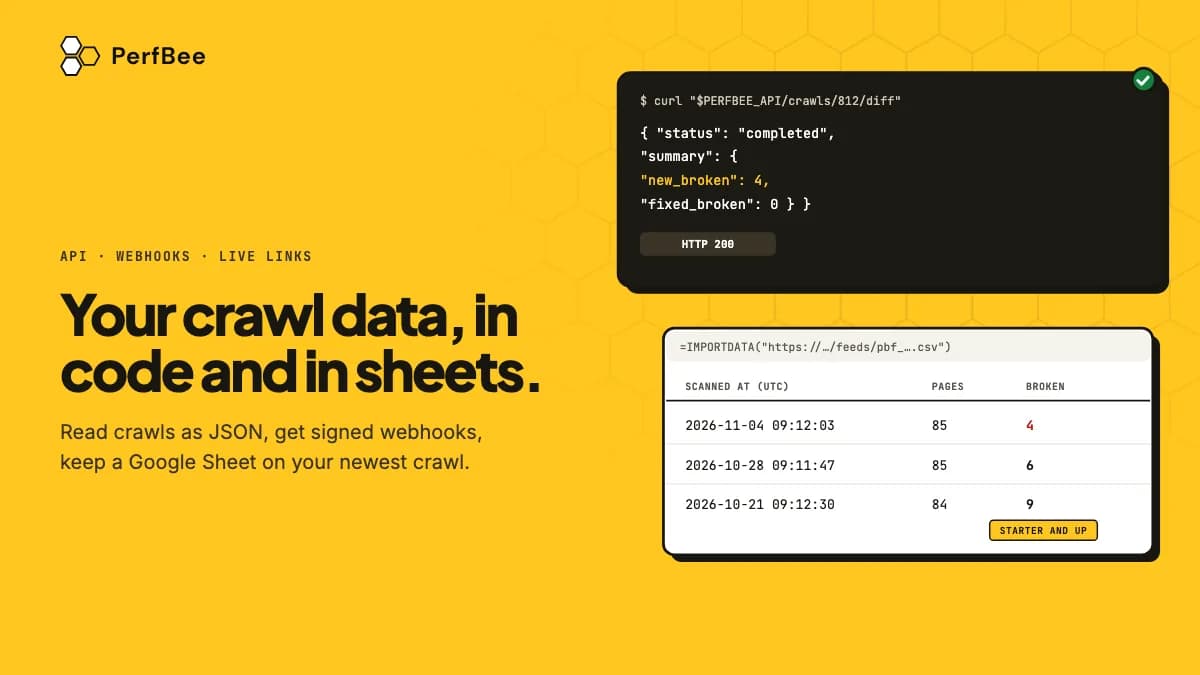
Then call GET /crawls/{id}?wait=25 until the status is final. Each call waits up to 25 seconds and answers the moment the crawl ends. When the status is completed, GET /crawls/{id}/diff compares the crawl with the one before it for the same site and mode. Its field summary.new_broken counts the links that are broken now and were not before: the number a deploy check needs. A crawl that ends failed, cancelled or partial has no diff.
Credits for an API crawl are spent at the dashboard's rates, and PerfBee checks the most a crawl can cost before it starts. A key that starts crawls also has a daily cap on the credits it may commit: 2,000 unless you choose another number.
The API also limits how often a pipeline can start a crawl. Each key has 10 crawl starts a day, and the workspace has 20 for all its keys. Only 2 API crawls of a workspace run at once. A site cannot be crawled through the API again until 10 minutes after the last API crawl started. A pipeline that crawls on every push will meet these limits, so crawl on a deploy instead. The recipes include a shell script that fails a deploy when a crawl finds new broken links.
Signed webhooks tell your tools when data is ready
Add an address under Settings, then Webhooks, or manage endpoints through the API with a key that has the webhooks scope. A workspace holds 5 endpoints, each at a public https address. Every endpoint you add gets a signing secret, shown once, and every delivery to it carries a PerfBee-Signature header: an HMAC-SHA256 of the timestamp, a dot and the raw body, made with that secret.
Crawl data ready is the event to wait for. It comes once for each crawl and site, after everything the crawl produced is in place: its pages, its checks and its fixes. Scan completed can come a little before it, at the moment the crawl ends. PerfBee tries a delivery again after a failure that may pass, such as a timeout or a 5xx answer, up to 5 attempts in all. The event id stays the same on every attempt, so a receiver can skip an event it has handled. The webhooks page lists the steps to check a signature, and the recipes have working code in Node, Python and PHP.
Live links keep a Google Sheet current
A live link is an address that returns one table of a site's data as CSV. Paste =IMPORTDATA("link") into a cell of a Google Sheet and the sheet reads it. Each read builds the table again; the crawl history lists every finished crawl, the rest use the newest. How often Google Sheets reads the address is Google's choice, and PerfBee does not control it.
Live links are on Starter and up and use no credits. A link holds one table: the crawl history, broken links, all URLs, SEO data or Site Pages. A table may have at most 50,000 rows and at most 2,000,000 cells, and PerfBee never cuts it: a table over the limit is refused. SEO data comes from the newest detailed crawl. Each link answers 12 reads an hour and stops working after 365 days. Replace it under Settings, then Live links, to start another 365 days. The address is a secret, and anyone who can open your sheet can read the data, so replace or revoke a link there if it leaks. For the steps, see our guide to updating Google Sheets with crawl data. The live links help article has the limits.
Claude and ChatGPT read the same crawls
The MCP server connects Claude and ChatGPT to your PerfBee account. It has seven tools. They list your sites, start a crawl and follow it, read a crawl's issues, the AI readiness report and the Fixes list, and compare a crawl with the one before. Only starting a crawl spends credits. The tools work on the sites in My Sites, and none returns numbers that come from Google. The MCP page has the connect steps and the limits.
What the API does not do
The API reads the crawls the Site Crawler makes, and a crawl you start through it is the same crawl the dashboard starts. Adding or removing sites, verifying ownership and changing schedules stay in the dashboard. The API runs no performance tests or Critical CSS, and it cannot mark a fix as resolved. Exports through the API, like live links, are on Starter and up. Keep a key out of browser code: store it on a server or in your CI secrets, because the API does not accept calls from a browser on another site. The API and webhooks help article lists the rules and the error codes you meet most.
Make a key with the read scope under Settings, then API keys. Call GET /me to see your plan and your credits, and GET /sites to find your site ids. Neither call costs a credit.