A crawl tells you which pages are broken, redirected or set to noindex. It cannot tell you which of them Google still shows to people. We shipped the missing half: numbers from Search Console, next to the pages the crawl read. More of this release is in What's new.
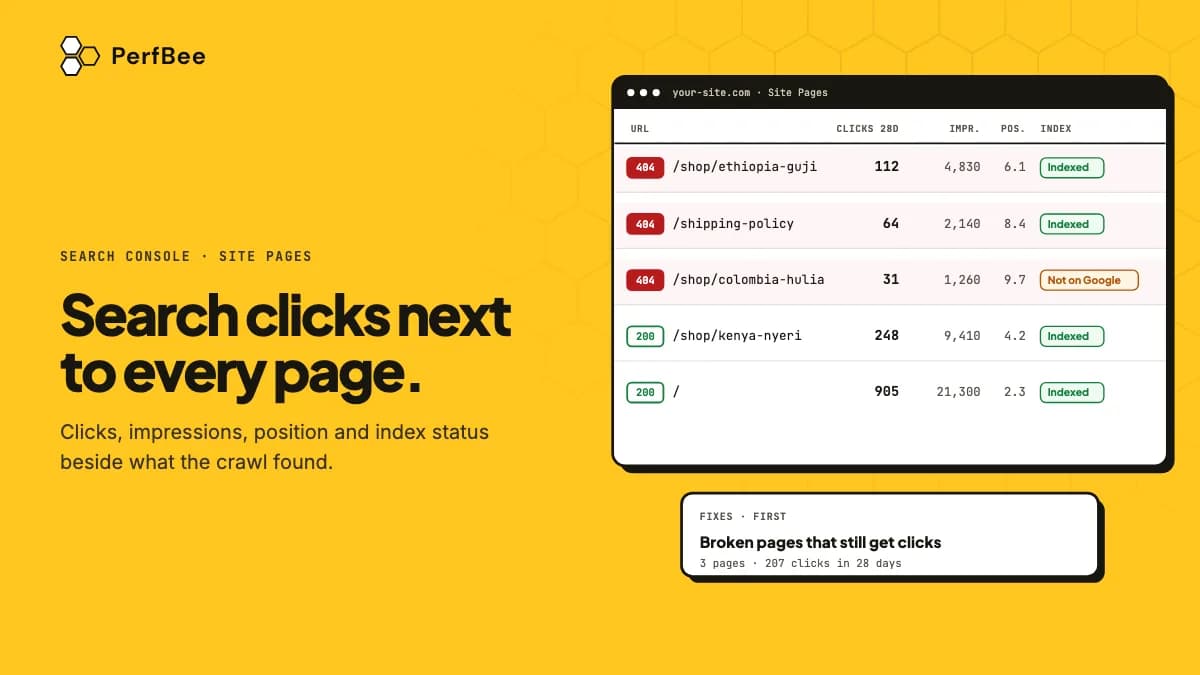
- From Search Console, PerfBee reads clicks, impressions and average position for the pages of your site. The connection is read-only, on every plan, and costs no credits.
- Site Pages shows the numbers next to what the crawl found. Only in Google lists addresses Google reports that no crawl reached.
- Inspect now asks Google about one page, on every plan. Scheduled index checks are on Starter and up.
Clicks and impressions sit next to what the crawl found
The workspace owner connects a Google account under Settings, then Integrations. Then you link a property to one of your verified sites in My Sites, and PerfBee offers only the properties that match the site. Clicks and impressions are for the last 28 days, compared with the 28 days before that. The average position covers the last 28 days. The help article Connect Google Search Console has the steps.
In Site Pages the numbers are the columns Clicks 28d, Impressions and Avg position. You can sort by clicks and filter to pages with search traffic. The Search tab of a page's detail shows the same three numbers for that page. It adds the change in clicks and impressions against the 28 days before.
The Fixes list reads the numbers as well: the more clicks the affected pages have, the higher a fix ranks. Two of its groups come from Google data:
- Pages with search traffic that are noindex, canonicalised or broken: pages Google showed in search that the crawl found noindex, pointing to another canonical or returning an error.
- Indexable pages Google has not indexed: pages the crawl finds indexable that Google's URL Inspection says are not in its index.
The article Search Console Numbers in Site Pages explains every column and filter.
Only in Google lists what the crawl never reached
This view lists addresses that Google reports numbers for and that no crawl of your site reached. For every address PerfBee notes what it knows: a redirect it has seen, a location outside the crawled folder, a query string, or a page your robots.txt blocks. If none fits, the row says unknown, and unknown means check it. Select rows and press Check these URLs to scan that list, up to 2,000 addresses. PerfBee shows the credits first, starts only after you confirm, and never crawls these addresses on its own. Such a scan does not mark any other page as missing.
Index status is Google's own answer
Open a page in Site Pages and press Inspect now on its Search tab. PerfBee asks Google for that page's index status and shows the answer in Google's words: whether the page is on Google, the reason, and the canonical Google picked. It never asks Google to crawl the page. You can use it on every plan, and it costs no credits. On the Free plan each site gets 10 Inspect now answers a day.
Scheduled index checks are on Starter and up. They cover up to 1,000 pages of a site a day, starting with pages that have search traffic and an open fix. A property gets 2,000 inspections a day from Google, and every tool connected to it draws on that number, so PerfBee takes at most half. The article URL Inspection: Google Index Status lists the order and the limits.
What PerfBee does not read and where the numbers go
PerfBee never reads search queries. Its requests for numbers ask Google for pages and dates only, and the connection is read-only, so PerfBee cannot change anything in your Google account. The numbers are not sold and not used for advertising. If you unlink a site or disconnect the account, PerfBee deletes the numbers.
You see the numbers in Site Pages, in Page Detail, in the order of the Fixes list and in the Site Pages files you download, which are on Starter and up. They do not go into the API, the Claude and ChatGPT tools, webhooks, live links, shared report pages or AI suggestions.
The numbers have limits
Google's final data is a few days behind, and PerfBee uses only final numbers. It refreshes once a day, and you can press Refresh once an hour for each site. Google reports no more than 50,000 pages, the ones with the most clicks, so a page it leaves out shows no number, never a zero. Average position is Google's average for the page. It is not rank tracking, and PerfBee has no keyword data. Google counts a page's clicks under the canonical address it picked, so a page that points to another canonical can show no numbers while that other address shows them. The index status is as of Google's last crawl of the page: a page you fixed today can keep its old status until Google visits it again.
All of this sits in the Site Crawler, so a crawl and its Google numbers stay in one list for each site.
Open Settings, then Integrations, and press Connect next to Search Console. Only the workspace owner can. Then link the property to a verified site in My Sites and open Only in Google first: it shows what your crawl missed.