A site with thousands of pages is hard to read as one list. We shipped three ways to look at part of it: segments, a page compare and a folder view called Structure. A detailed scan also lists orphan pages by a corrected rule and checks headings and sitemap hreflang, and a sampled test runs axe-core on one example page of each of your biggest templates. More of this release is in What's new.
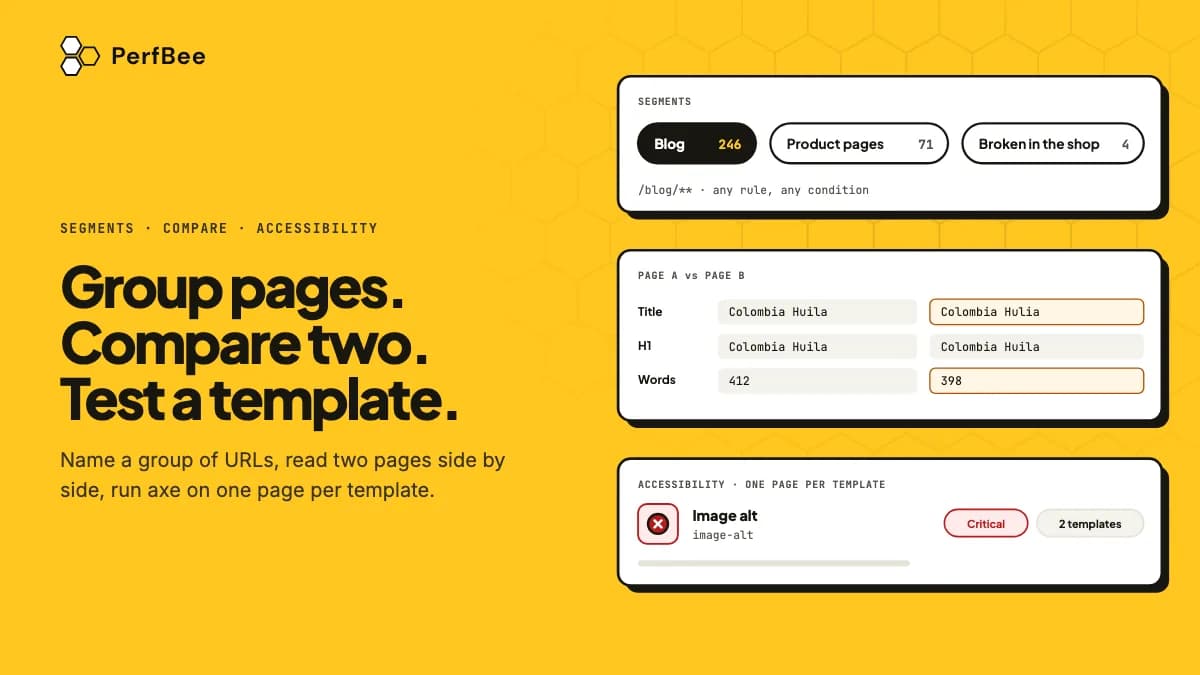
- Segments name a group of URLs with path rules. Site Pages filters, counts, marks resolved and downloads them. A segment costs no credits and starts no scan.
- Compare with another page reads two pages live and keeps nothing. Structure shows folders, click depth and a treemap from what scans already found. Neither costs credits.
- Accessibility by template tests one example page of each of up to 10 templates with axe-core. It costs 2 credits for each tested page, and you confirm the total first.
Segments name the part of the site you work on
A segment is a named group of one site's URLs, such as Blog or Product pages. A URL is in it when it matches any of the segment's rules: a glob such as /blog/** or a regular expression. You can narrow a segment by status, type or indexability. A segment holds rules, not URLs, so a page that matches joins as soon as a scan finds it.
Site Pages can then show one segment at a time, with a count for each segment. Marking resolved acts on exactly the URLs the segment shows, and a download keeps the segment filter. Segments cost no credits, start no scan and are on every plan. Downloads are on Starter and up. The article on segments lists the rule syntax.
Compare and Structure show the shape of a big site
Compare with another page sits in a page's detail. It reads two pages of the site live, as PerfBeeBot and at the pace your robots.txt asks. Then it shows what differs: the status, whether each page can be indexed, the title, the meta description, the canonical, the headings and the main text word by word. It uses no credits and keeps nothing. It reads the HTML a scan without JavaScript rendering reads, so content a script adds later is not in the comparison. The article on comparing pages says what it sends to your site.
Structure draws the site as folders: how many pages each holds, how many work, redirect or are broken, and how many are weakly linked or deep. The Depth view counts the clicks from the start page. The treemap draws folders as rectangles: the area shows pages and the colour shows the share of pages with errors. Errors and warnings need a detailed crawl. Structure is built from what your scans already found, so it costs no credits. It is on every plan, and its download is on Starter and up. See the article on Structure. Segments, Compare and Structure all start from the list of URLs that Site Pages keeps for each site in the Site Crawler.
The orphan list is corrected and a detailed scan checks more on each page
An orphan is a page you cannot reach by clicking from the start page. The old count missed two kinds. A page linked only to itself is now listed, and so is a page that only other orphans link to. The list holds up to 10,000 pages. The orphan list comes from a detailed scan. After your next detailed scan the count can go up although nothing on your site changed, and it can go down for a page you reach only through a redirect. The article on orphan pages says why.
A detailed scan also checks headings and the hreflang entries in your XML sitemap. The heading checks flag an H1 longer than 70 characters, heading levels that skip, and an H1 that is an image with no alt text. The 70 characters are our own rule: Google sets no limit for an H1. The sitemap checks flag a value that is not valid and an entry with no return link. They also flag a page and its sitemap entry that name different sets of alternates. They add no request to your site and no credits. The heading and sitemap hreflang article lists all six checks.
Accessibility by template tests a sample
Accessibility problems usually sit in the template: the menu, the footer, the product card. So the test takes one example page from each of up to 10 of your biggest templates. It opens the page in a browser as PerfBeeBot and runs axe-core on it. Before anything is spent you see the pages and the credits, and you confirm the total. Each tested page costs 2 credits, on every plan. A page that could not be tested costs nothing. Findings are grouped by rule and by template, and each rule with a violation is one fix in the Fixes list. These fixes are for you only: they are not in the API, the Claude and ChatGPT tools, webhooks or emails. The download of a run's findings is on Starter and up.
It is a sample, and automated rules find only a part of the problems. Passing every rule does not make a site accessible. The run does not sign in, so pages behind a login are not tested. Our guide to accessibility testing by template explains how many pages to test, and the article on accessibility by template has the details.
Staging sites can be crawled through a tunnel
PerfBee crawls from the internet and cannot enter a private network or a VPN. If you can put a staging site on a public address through a tunnel and let in only requests that carry a service token, PerfBeeBot can crawl it. Staging access is on Starter and up and needs a site you verified. The article on staging through a tunnel walks through it step by step.
Open Site Crawler, then Site Pages, pick a site and press Create a segment. Start with your biggest folder, for example /blog/**, and read the preview count before you save. A segment costs no credits.